
- Google’s new personal-install route is rolling out; it does not make a private prototype a ready-made team system.
- A recurring task with simple inputs and an easy manual fallback is a useful first experiment.
- Check the result, data handling, costs and recovery before making the app part of daily work.
Prepared with AI-assisted research and source checks on October 14, 2026. The shop, app brief and rehearsal below are illustrative. The new Google Play installation flow was not tested for this article; no independent review by Jaden is claimed.
What actually changed this week
On October 13, Google announced that Android apps built in Google AI Studio could start reaching their creator’s own device through Google Play using a standard Google account. The rollout covers adults 18 and older in selected markets, including the US. These personal apps remain separate from the public catalog. Sharing with friends and family is planned for coming months; public release requires a professional developer account and the usual reviews. Access may arrive gradually. [1] (opens in a new tab)
Android app generation itself is older: Google announced it in May. This week’s useful change is a simpler personal distribution route. It is a reason to revisit a small idea you have been postponing, rather than evidence that all the work of building dependable software has disappeared. [2] (opens in a new tab)
Think about a task whose awkwardness you know well. You repeat it, the rules fit on a page, and checking the answer is straightforward. That is a more manageable experiment than asking a builder to recreate your entire business.
Give it one job that you can explain without a diagram
Consider a fictional ceramics seller preparing for a weekend market. They already know which mugs and bowls they want to bring. Their recurring nuisance is turning that plan into box counts, then remembering what still needs packing. A personal tool could put the quantities, packing progress and remaining items on one screen.
For an illustrative calculation, suppose a particular box holds six mugs safely, using the seller’s existing packing method. Taking 14 mugs requires three boxes: two containing six and one containing two. The rule is to divide by six and round up. If the app reports two boxes, its attractive interface has not made it useful.
That brief describes a desired tool, not a claim that a particular prompt will deliver it correctly. A first version could use manual item entry and ordinary arithmetic. It does not need an AI model making a fresh prediction every time you count a mug. The AI can help create the software while the finished tool follows explicit rules.
The same approach could suit a display setup checklist, a personal equipment count or a calculator for a clearly defined nonfinancial estimate. If a notes app or spreadsheet already handles the job comfortably, there may be little benefit in maintaining something new.
The moment someone else depends on the answer
Now change the story. Another worker is packing at the same time. They both need to see which stock has already gone into a box. Or a customer wants to reserve the last blue mug. The problem now includes shared records, access rules and conflicting changes. A private packing screen does not resolve those requirements by itself.
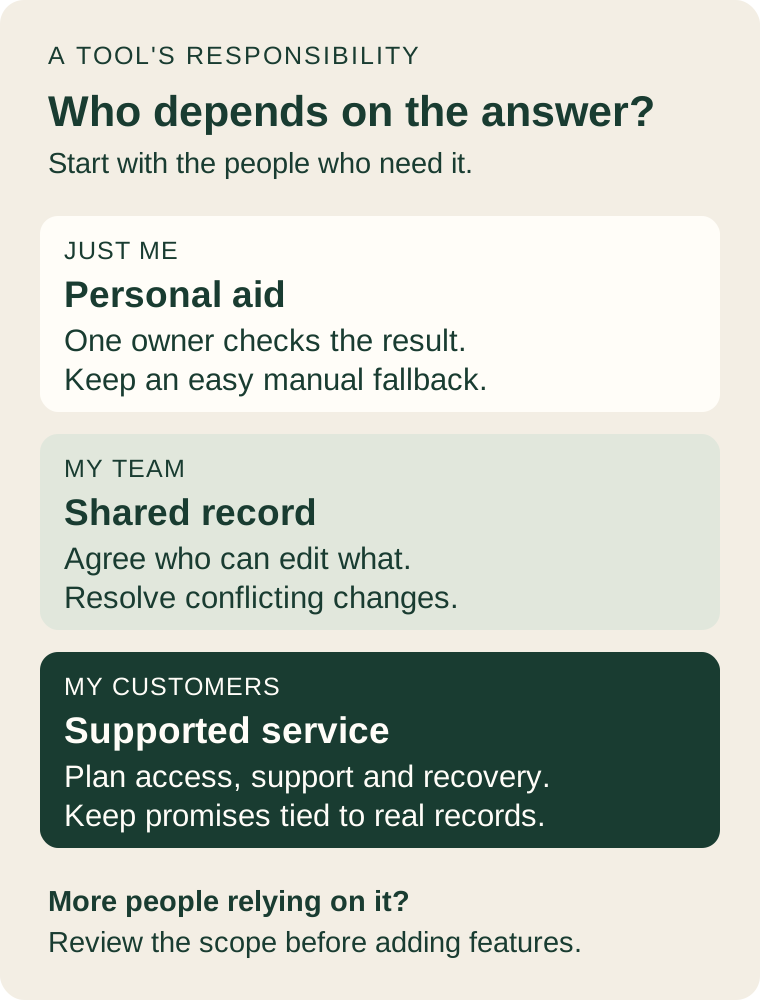
Google’s Android-building documentation currently describes client-side apps, with server features such as Firebase integration, Google Workspace APIs and secrets management unavailable in that Android path. The page is dated August 18 and still describes the older internal-testing publication route. Read its limits separately from the newer October announcement; follow the installation instructions offered in your account as the rollout reaches you. [3] (opens in a new tab)
For the shop, the sensible boundary is clear: experiment with your own packing aid using copied sample counts. Before making it the stock record everyone relies on, decide where the shared information lives, who may change it, how disagreements are handled and how the business keeps working during an outage.
The linked Kundan HQ portfolio project connects inventory with sales, customer records and fulfillment. That illustrates the broader scope of a business system. It is not an AI Studio personal app or evidence that Google’s new feature delivers those connections.
Private installation leaves other questions to answer
Who can install an app and who receives its data are different questions. Under Google’s unpaid-service terms, submitted content and generated responses can be used to improve its products, and human reviewers may process them. Those terms say not to submit sensitive, confidential or personal information. Check which terms apply to your account and services before entering business data. [4] (opens in a new tab)
For this experiment, invented product names and quantities are enough. Leave customer addresses, staff records, passwords and confidential supplier information out of the prototype. Ask where the finished app saves information, whether it sends anything to an external service, and what happens when the phone is replaced. A private listing does not answer those questions.
Costs need the same separation. Google’s developer pricing includes free and paid access with different model and usage limits. If you add an AI service to the finished tool, check its actual rate and limits. The news announcement is not a quote for building, maintaining or operating your particular app. [5] (opens in a new tab)
Even a tool without ongoing AI calls takes time to test, fix and maintain. Before starting, set a modest time budget and name the irritation you expect to remove. Do not add image recognition, chat or automatic ordering merely because a builder can suggest them.
Rehearse an ordinary day—and an awkward one
With the fictional packing planner, begin on paper. For a six-mug box, quantities of 0, 6, 7 and 14 should require 0, 1, 2 and 3 boxes. Check those answers yourself. Then try a blank input, a negative quantity, zero capacity and a correction after marking items packed. The tool should explain a problem without silently producing a plausible number.
Close and reopen it. Rotate the phone. Increase the text size. Interrupt the task halfway through. If you want it to work without a connection, test that on the actual device instead of assuming it. Work out how to recover or export a plan before putting the only copy of useful information inside it.
Permissions should match the task. Android’s security guidance recommends requesting only the permissions an app needs. A manually entered packing count gives you a good reason to question requests for contacts, microphone access or location. [6] (opens in a new tab)
Keep a paper or existing-software fallback during a small pilot. Record how long the task takes, how many corrections you make and whether preparing the app creates more work than it removes. A faster first attempt is encouraging; repeated use with fewer errors is a better reason to keep it.
The useful idea can stay small
A personal app can be a way to learn what a useful screen should contain before commissioning a larger system. The ceramics seller might discover that undo matters more than a dashboard, that box capacity changes by item, or that a printed packing list remains essential. Those observations would make a later project brief more specific.
Choose the smallest task you can check, keep the experiment reversible, and let actual use tell you whether it deserves more work. If you want to turn that experiment into a shared business tool, start by describing who needs the same information and what they need to do with it.
Sources & further reading
Sources used in this guide. Checked October 14, 2026. Study dates and scope are shown where they affect the interpretation.
- 01Google Play’s October 13 announcement (opens in a new tab)Google
Dated rollout announcement; personal installation, eligibility and future sharing.
- 02Android app building announced in May (opens in a new tab)Android Developers
May 19, 2026 announcement establishes that Android generation predates this week’s distribution change.
- 03Build Android apps in Google AI Studio (opens in a new tab)Google AI for Developers
Documentation dated August 18; use for current documented build limits, not the new personal-install click path.
- 04Gemini API Additional Terms of Service (opens in a new tab)Google AI for Developers
Read the terms applicable to your account and services, especially data handling. This guide is not legal advice.
- 05Gemini Developer API pricing (opens in a new tab)Google AI for Developers
Free and paid access differ by model and usage. No fixed total price is promised for a custom app.
- 06Improve your Android app’s security (opens in a new tab)Android Developers
Official guidance supports requesting only permissions needed for the app’s function.